Amazon Shout-Outs
Bringing Amazon's peer recognition app to corporate employees.
Make recognition a natural part of Amazon culture, in support of the Leadership Principle ‘Strive to be Earth’s Best Employer.’
I worked with UXR, owned the end-to-end design and led stakeholder and leadership reviews. I was the lead designer for sending a Shout-Out and for the Slack and Chime integrations.
2 product leads, 7 engineers, 1 designer (me), 1 shared UX researcher and 1 copywriter.
Planned rollout in the USA and Canada in November 2023.
How do we expand an existing experience to salaried and corporate employees?
Because of the impact Shout-Outs had in the associate experience, our parent org adopted the goal to expand the product to all salaried employees in order to improve employee sentiment and drive connection across salaried Amazonians. It was also meant to replace all current recognition platforms (Accolades and Celebrate) and become the go-to product for recognition and celebrations at Amazon.
What Shout-Outs did for associates
Job satisfaction
Feelings of recognition
Feelings of connectedness
Overall sentiment
Sense of accomplishment
Feelings of being valued
What I owned
The send flow on web and mobile, the Slack and Chime integrations, research with our UXR partner, and copy in 12 languages.
Sending a Shout-Out
Design the flow for starting and sending a Shout-Out, on web and in the mobile app, from mid-fi to hi-fi, and run the design reviews.
Slack and Chime
Work out where Shout-Outs could live beyond its own app, starting with Slack and Chime.
Research
Run research with our UXR partner: write the 6-pager that set out our hypotheses, interview users and moderate usability sessions.
Copy and localization
Write the copy for the whole experience, including email, push and bell notifications, and localize it into 12 languages.
Validating our hypotheses
Goal: Understand how people recognize each other today, online and offline, find the gaps, and check our assumption that formal recognition matters to employees.
- How do salaried employees experience recognition today? What are the gaps and the best practices?
- What would be a meaningful change to their workplace, in terms of recognition?
- How do they use other tools, and do they want recognition built into them?
- Where and why are they turning to third-party tools, and how might we fill that gap?
- Too many notifications about recognition can be distracting.
- Amazonians want to send and receive recognition without going to a separate site.
- Recognition matters to Amazonians, but they forget to send it.
- Formal recognition can mean more than a Slack message or a verbal thank-you.
- Some Amazonians prefer to be recognized only in private.
Interviews
We interviewed 14 people across levels, demographics and teams at Amazon.
People love public recognition
It mostly happens over email, in Slack and at stand-ups.
Recognition from a manager counts more
People feel recognition from their manager matters more than from a peer.
Automated milestones are fine
Most people are happy to get automated recognition for work milestones.
Survey responses
We sent the survey to all corporate and salaried employees worldwide, and 30,347 people responded.
say recognition from their manager is important or very important
say recognition from peers is important or very important
What we decided to act on
How might we make it easy for managers to spot and recognize their people?
Which pins would mean the most to salaried and corporate employees?
Which automated pins should we include at launch without the recognition feeling robotic?
How do we keep it fun and engaging, and separate from performance reviews?
Risks and how we handled them
Moving to the wider corporate group raised a few risks we had to answer for.
Associates and salaried employees would get different features, such as free text, comments and public recognition.
✓ We matched what the existing tools already allowed.
Free text means someone could write something inappropriate.
✓ We added a way to report a message.
Any recognition tool risks bias.
✓ We nudge managers to recognize their direct reports more evenly.
Some employees don't want to be recognized in public.
✓ People can mark a Shout-Out as private, or opt out entirely.
The mobile send flow
The final mobile designs for sending a Shout-Out, in three steps.
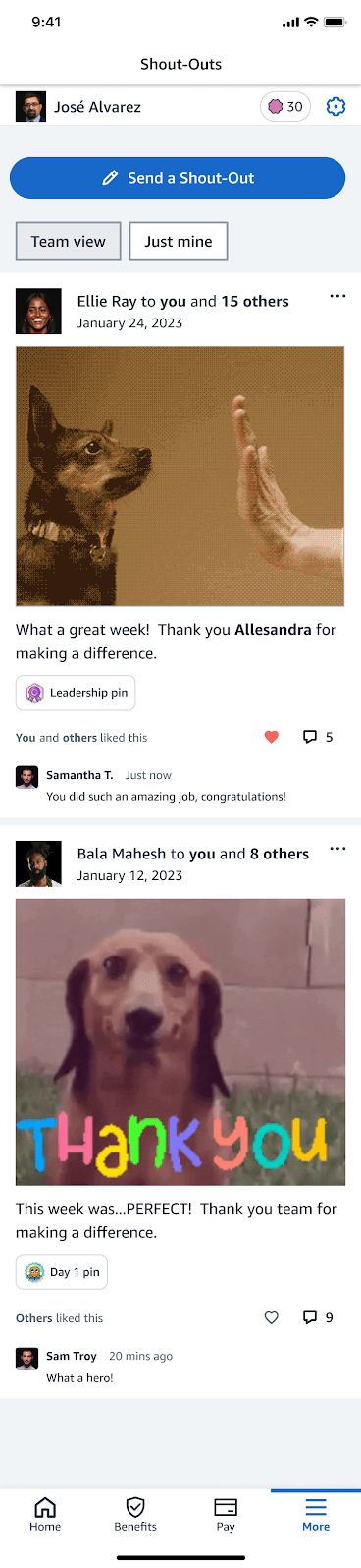
The feed
Shout-Outs you and your team received, with comments.
✓ Switch between Team view and Just mine
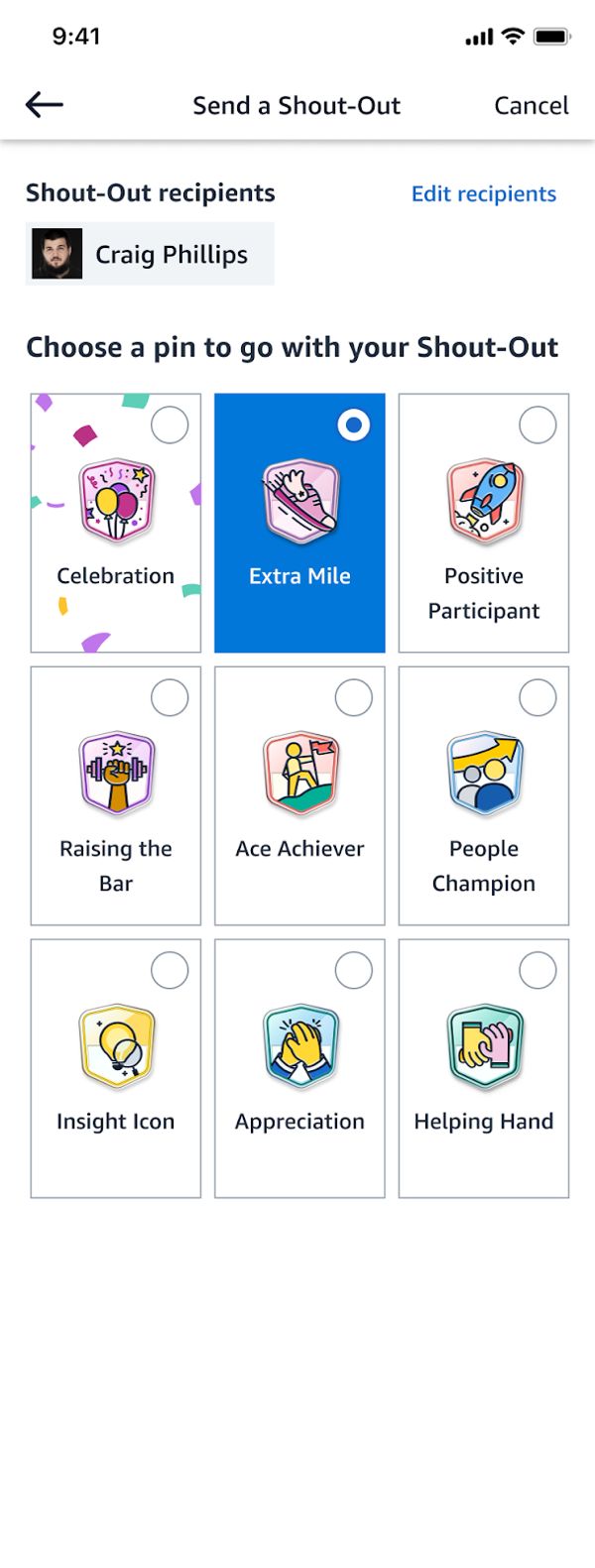
Pick a pin
Choose a pin to go with the Shout-Out, like Extra Mile, Positive Participant or People Champion.
✓ Pins chosen for corporate work
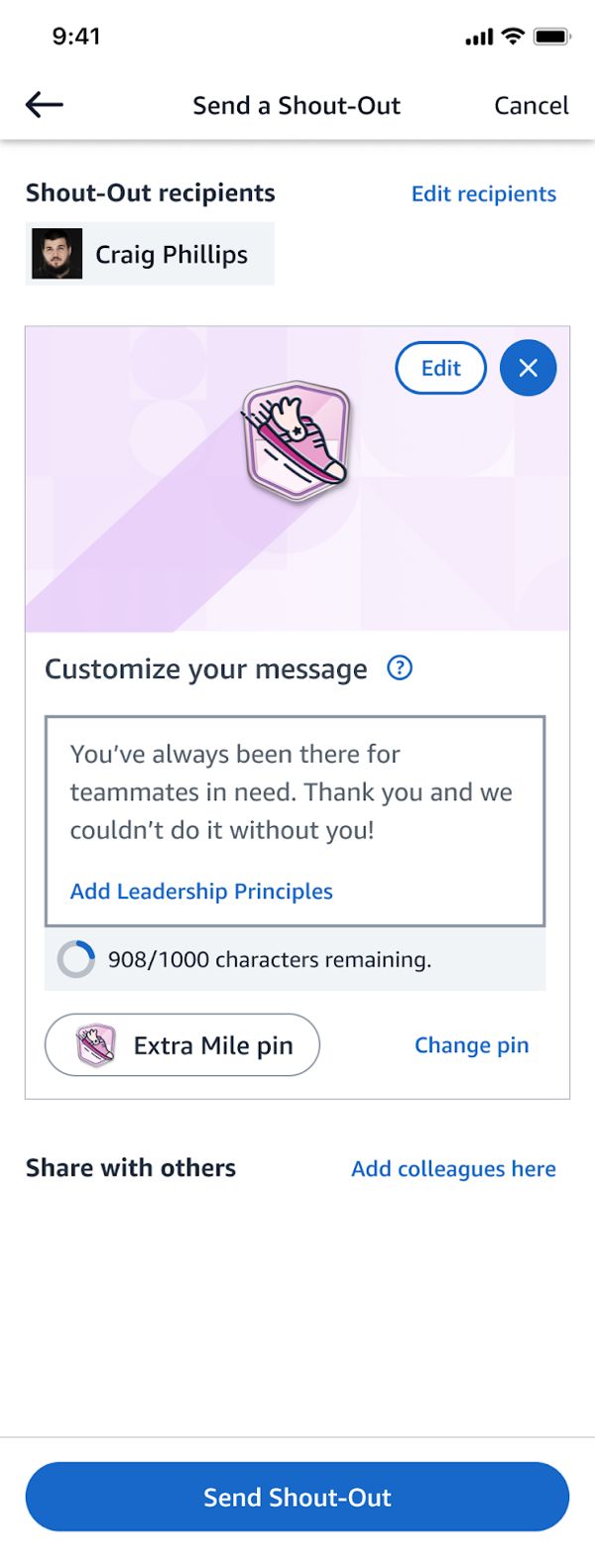
Write the message
Add a personal message before sending.
✓ Option to keep it private
Desktop explorations
Three directions for the desktop send flow, with the feedback from design reviews.
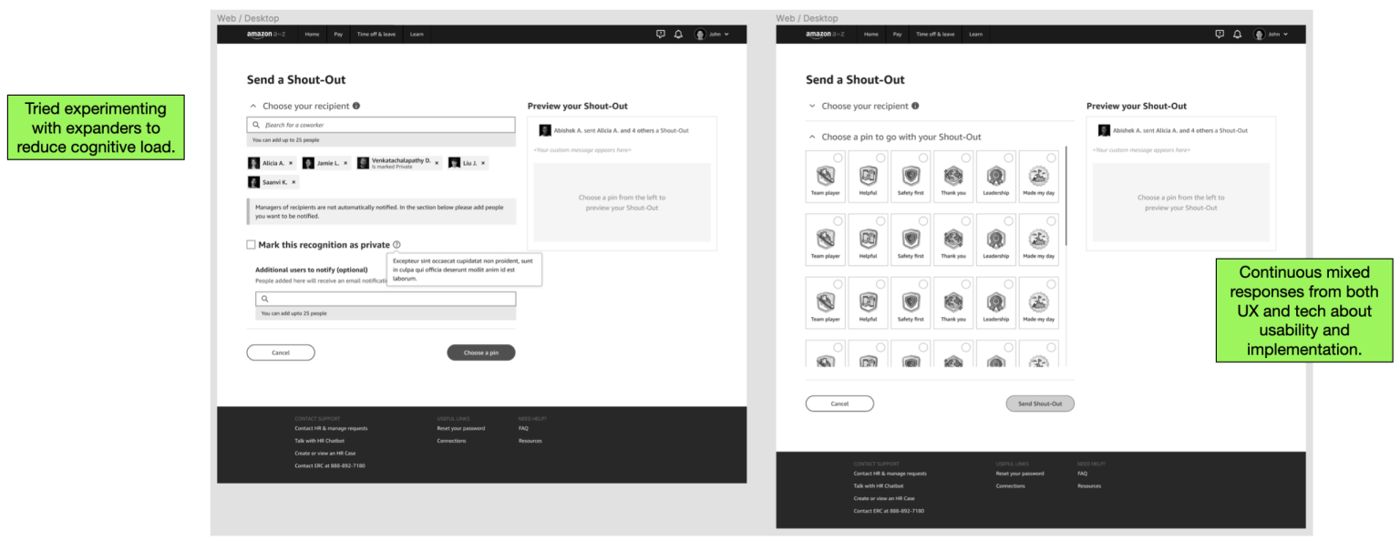
Expanders
I tried collapsible sections to reduce cognitive load. Feedback from UX and tech was mixed on usability and implementation.
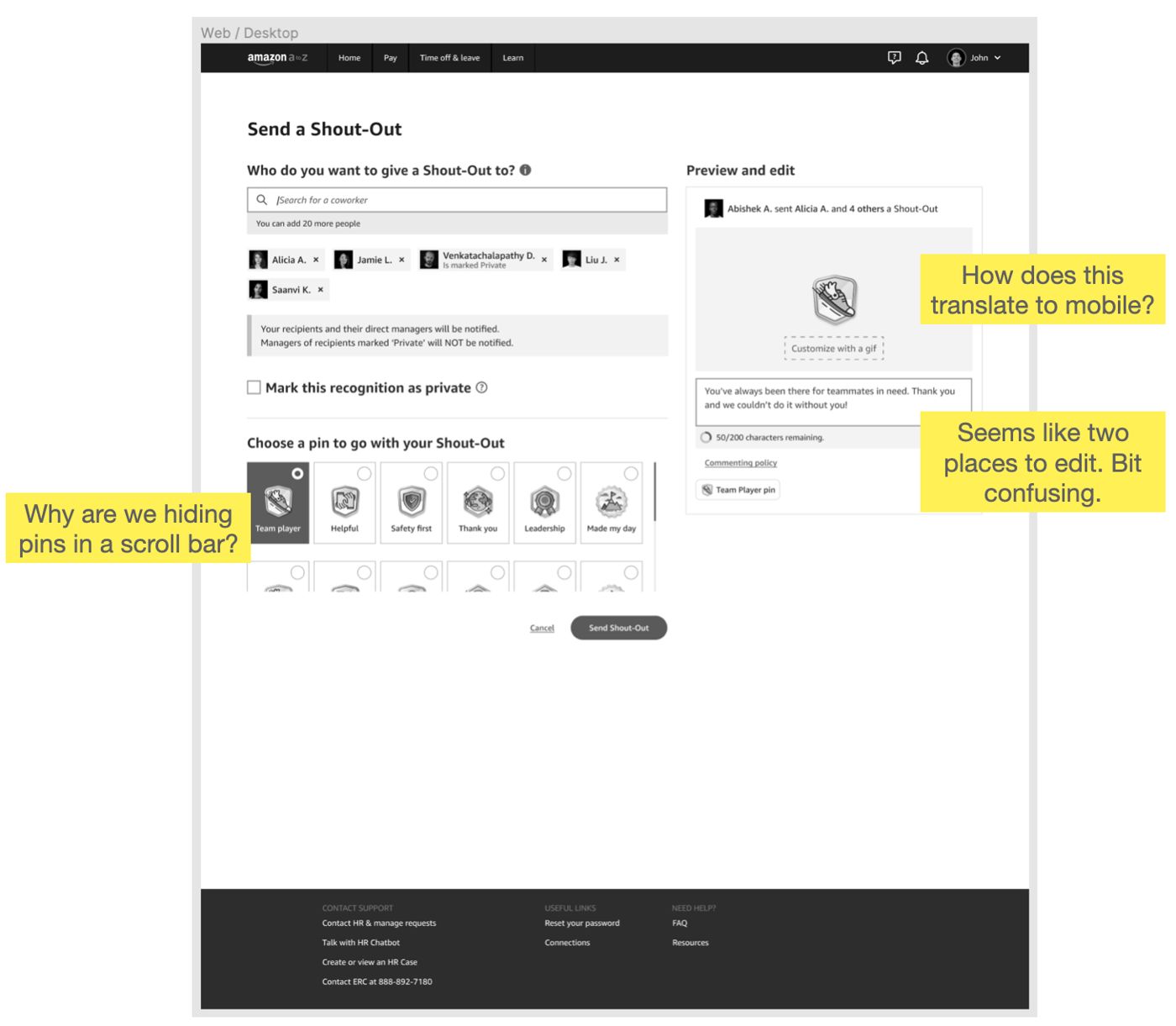
Two panels
Editing on the left with a live preview on the right. Reviewers asked how it would work on mobile, and found two places to edit confusing.
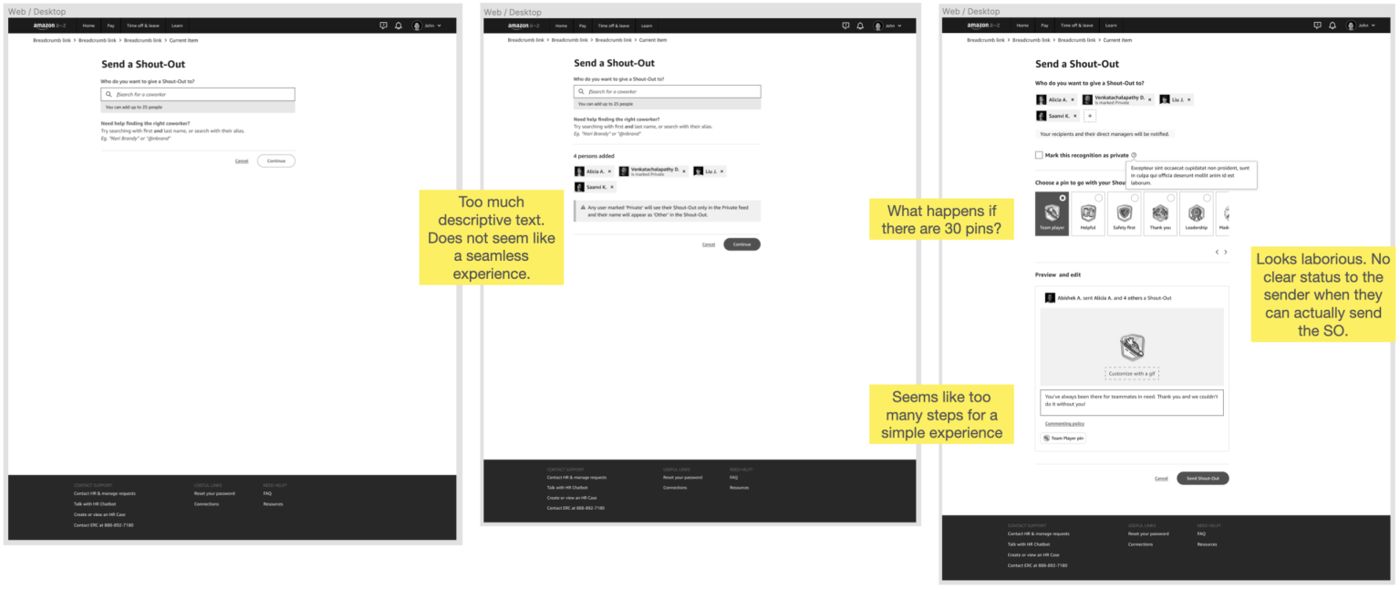
Steps
One step at a time. Reviewers asked what happens when there are many pins, and whether it felt like too many steps for a simple task.
Design and review
There was already a flow for sending a Shout-Out, but it changed fundamentally for salaried and corporate employees. The key additions were:
Finding and adding peers based on their circle of influence, their team or the reporting structure.
Writing a message in free text, and handling the risks that come with it.
Marking a Shout-Out as private.
Opting out.
The send flow
- Choose who to recognize
- Pick a pin
- Write a message (optional)
- Choose public or private
Usability testing
I ran moderated usability sessions with our UXR partner to see whether people could:
Find how to start sending a Shout-Out.
Add peers, choose a pin and write a message.
Go back and change an earlier step.
Send it and interact with the card in the feed.
Copy, accessibility and 12 languages
Amazon is Born Accessible, which means every design has to be accessible at launch.
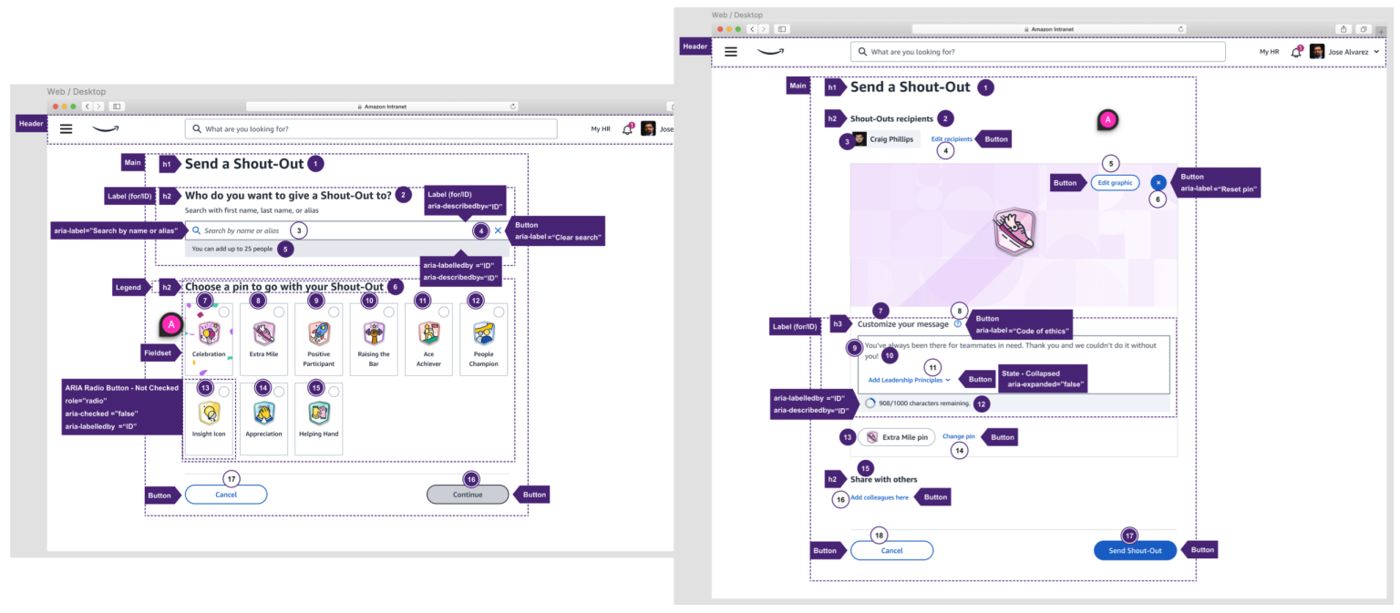
I mark up every label and the tab order in our internal markdown system. No design goes to the developers until this step is done.
I write the first pass of the copy, then finalize it with a copywriter. It covers the whole experience, including email, push and bell notifications, in 12 languages.
How we define success
Two measures: engagement and sentiment.
Monthly product engagement goal
The same engagement rate Shout-Outs has with associates.
Employee sentiment
We use internal survey tools to track themes like job satisfaction and feeling connected.
Try the prototypes
Try the send flow in Figma.